Robotic Process Automation (RPA) Explanation
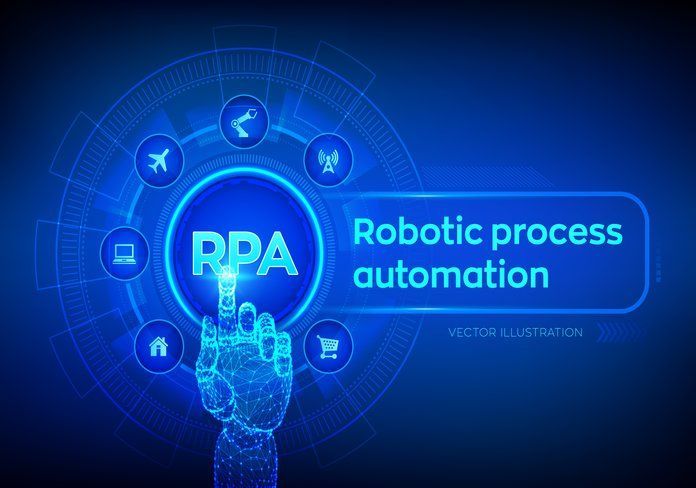
Robotic Process Automation (RPA) is a technology that utilizes software robots, or “bots,” to automate repetitive tasks typically performed by humans within business processes. These bots mimic human actions to interact with digital systems, reducing manual effort, enhancing efficiency, and minimizing errors. RPA can handle tasks such as data entry, invoice processing, and customer service inquiries, freeing up human workers to focus on more strategic and creative endeavors.
What is robotic process automation (RPA)?
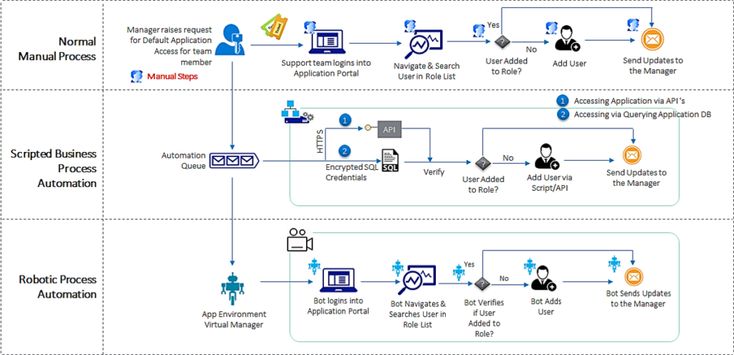
Robotic Process Automation (RPA) is a technology that enables businesses to automate routine tasks that humans typically perform. It involves the use of software robots, or “bots,” to emulate and integrate the actions of a human interacting within digital systems to execute a business process. RPA bots can interact with various applications and systems just like a human would but without the need for physical presence and with much greater speed and accuracy.
Key characteristics of RPA include:
- Rule-Based Automation: RPA works best with rule-based, structured processes. It can automatically carry out tasks where the steps and outcomes are clearly defined.
- Non-Intrusive Nature: RPA tools can work on top of existing IT infrastructure and applications, meaning they don’t usually require significant changes to existing systems.
- Scalability: Bots can be quickly scaled up or down to meet fluctuating workload demands.
- Integration Capabilities: RPA can integrate disparate systems, enabling automation across various software applications without the need for complex system integration.
- Accuracy and Consistency: RPA reduces the risk of human error and ensures consistency in performing repetitive tasks.
- Cost-Effectiveness: By automating routine tasks, businesses can save time and reduce costs associated with human labor.
RPA is commonly used in various industries for tasks like data entry, invoice processing, customer service, and report generation. It’s particularly beneficial for automating repetitive, mundane tasks, allowing human workers to focus on more complex and strategic activities.
How does robotic process automation (RPA) work?
Robotic Process Automation (RPA) works by mimicking the actions a human user would take to complete digital tasks. It uses software robots, or bots, to automate routine and repetitive tasks across various applications and systems. Here’s a simplified explanation of how RPA works:
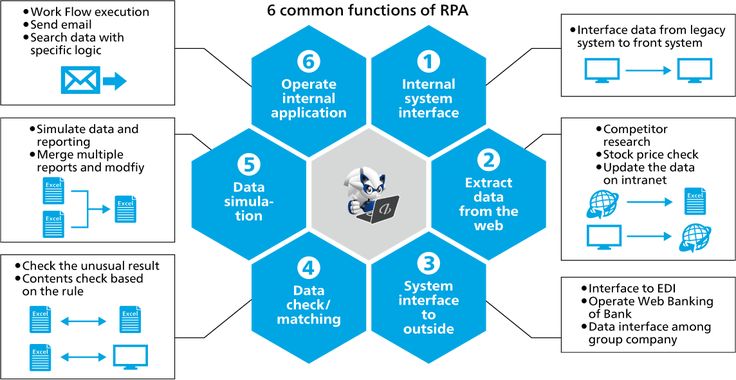
- Programming the Bot: The process begins with setting up the RPA bot. This involves programming or training the bot to perform specific tasks. This can be done through a graphical user interface (GUI), where developers script the actions the bot should take.
- Integration with Applications: RPA bots are designed to interact with different applications just like a human would. They can log into applications, enter data, calculate and process transactions, and perform other definable actions.
- Following Rules: Bots follow predefined rules and logic. They can execute processes based on the inputs they receive and the rules programmed into them.
- Interacting with User Interfaces: RPA bots interact with the user interfaces of business applications. They can read from and write to different UI elements, such as forms and tables.
- Automating Tasks: Once configured, bots can automatically perform the assigned tasks. They can handle tasks such as extracting data from documents, filling out forms, generating reports, and more.
- Scaling and Adjusting: RPA systems can be scaled up or down depending on the workload. Bots can be easily replicated to handle increased volumes or can be adjusted to meet changing business requirements.
- Error Handling and Logging: RPA bots can be configured to handle errors in a predefined manner and can log their activities for audit and improvement purposes.
- Human Intervention: While RPA can automate many tasks, there might be instances where human intervention is required, especially for complex decision-making or handling exceptions.
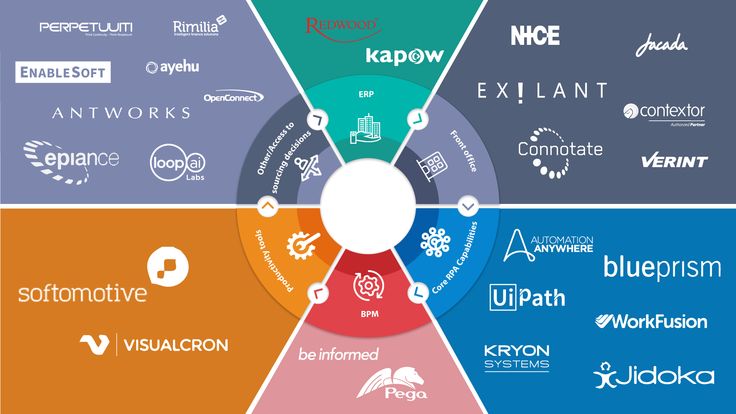
RPA Tools and Technology Landscape
This can be an overview of the various RPA software available on the market, their features, and how to choose the right one for specific business needs.
RPA Tools
RPA Use Cases and Applications
Robotic Process Automation (RPA) has a wide range of applications across various industries, significantly improving efficiency, accuracy, and productivity. Here are some common use cases and applications of RPA:
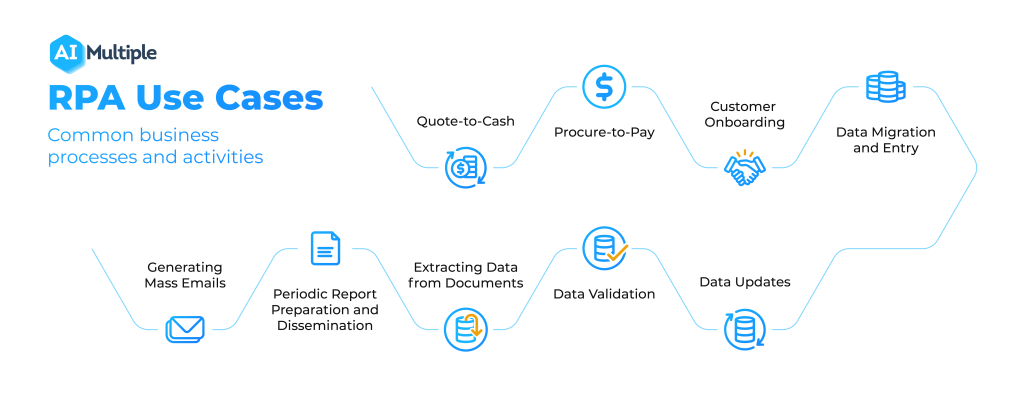
- Finance and Accounting: Invoice Processing: Automating the capture and entry of invoice data into accounting systems.
- Accounts Payable and Receivable: Streamlining the process of managing accounts payable and receivable.
- Financial Reporting: Generating financial statements and reports automatically.
- Human Resources: Employee Onboarding: Automating the onboarding process, including setting up IT accounts and benefits enrollment.
- Payroll Processing: Automating the collection, calculation, and processing of payroll data.
- Time and Attendance Management: Managing employee time-off requests and attendance records automatically.
- Customer Service and Support: Automated Responses: Providing instant responses to customer inquiries via chatbots.
- Customer Data Management: Updating and managing customer data across various platforms.
- Ticket Management: auto-generating and assigning support tickets to relevant departments.
- Healthcare: Patient Appointment Scheduling: Automating the scheduling and rescheduling of patient appointments.
- Claims Processing: Streamlining the processing and management of insurance claims.
- Medical Record Management: Automating the entry and retrieval of patient medical records.
- Retail and e-commerce: Inventory Management: Automating the tracking and restocking of inventory.
- Order Processing: Automating the entire order entry, processing, and tracking cycle.
- Customer Feedback Analysis: Analyzing customer feedback and reviews for insights.
- Supply Chain and Logistics: Shipment Scheduling and Tracking: Automating the scheduling of shipments and tracking deliveries.
- Vendor Management: Managing vendor interactions and transactions automatically.
- Demand and Supply Planning: Automating demand forecasting and supply chain planning.
- IT Operations: Data Migration and Entry: Automating the process of data transfer and entry between systems.
- Regular Backups: Setting up automated systems for regular data backups.
- Network Monitoring: continuous monitoring of the network and systems for issues.
- Legal and Compliance: Compliance Reporting: Automating the creation of compliance documents and reports.
- Contract Management: Managing and monitoring legal contracts throughout their lifecycle.
- Banking and Financial Services: Loan Processing: Automating various stages of loan application processing.
- Fraud Detection: Assisting in detecting potentially fraudulent activities.
- KYC Process: Automating the Know Your Customer (KYC) compliance process.
These use cases illustrate the versatility of RPA in automating tasks that are rule-based and repetitive, thus allowing organizations to reallocate human resources to more strategic and creative tasks.
Planning and Implementing RPA Solutions
Planning and implementing robotic process automation (RPA) solutions in an organization involves several key steps to ensure success and maximize the benefits of automation. Here’s a structured approach:

- Identify automation opportunities: Conduct a thorough analysis of your business processes to identify tasks that are repetitive, rule-based, and time-consuming.
- Prioritize processes that are prone to human error or have high operational costs.
- Define objectives and scope: Clearly define what you aim to achieve with RPA (e.g., cost reduction, efficiency improvement, error reduction).
- Determine the scope of the initial implementation; start small with processes that are easier to automate.
- Secure stakeholder buy-in: Engage key stakeholders across departments to secure their buy-in and support.
- Communicate the benefits of RPA and address any concerns related to job displacement or changes in workflow.
- Select the right RPA tool: Evaluate various RPA tools available on the market based on your specific requirements, budget, scalability, and ease of use.
- Consider factors like integration capabilities with existing systems, security features, and vendor support.
- Develop a governance framework: Establish guidelines for RPA development, deployment, and maintenance.
- Include policies for compliance, data privacy, and security.
- Assemble an RPA Team: Form a cross-functional team including IT professionals, process owners, and RPA developers.
- Ensure the team has the necessary training and skills for RPA implementation.
- Design, Develop, and Test: Map out the process flow and design the automation workflow.
- Develop the RPA scripts and configure bots.
- Conduct thorough testing, including user acceptance testing, to ensure the automation works as expected.
- Plan for Change Management: Develop a change management plan to address the impact of RPA on employees and processes.
- Provide training and support to employees so they can adapt to new workflows.
- Deploy and monitor: Roll out the RPA solution in a controlled environment.
- Monitor the performance of RPA bots and make adjustments as necessary.
- Scale and optimize:
- After initial success, identify other processes that can benefit from RPA.
- Continuously review and optimize the performance of RPA implementations.
- Review and improve:
- Regularly review the outcomes against the set objectives.
- Seek feedback and continuously improve the RPA solutions for better performance and higher efficiency.
Successful RPA implementation is not just about technology; it’s equally about people, processes, and planning. An organization must be prepared for cultural shifts and must manage expectations throughout the journey. Additionally, staying
5 ways to define RPA in plain English
- “In layman’s terms, RPA is the process by which a software bot uses a combination of automation, computer vision, and machine learning to automate repetitive, high-volume tasks that are rule-based and trigger-driven.” David Landreman, CPO of Olive.
- “Robotic process automation is nothing but instructing a machine to execute mundane, repetitive manual tasks. If there is a logical step to performing a task, a bot will be able to replicate it.” -Vishnu KC, senior software analyst lead at ClaySys Technologies.
- “RPA is software that automates rules-based actions performed on a computer.” Chris Huff, chief strategy officer at Kofax.
- “RPA is an advanced form of business process automation that is able to record tasks performed by a human on their computer and then perform those same tasks without human intervention. Essentially, it is a virtual robot copycat.” Marcel Shaw, federal systems engineer at Ivanti.
- “Put simply, the role of RPA is to automate repetitive tasks that humans previously handled. The software is programmed to do repetitive tasks across applications and systems. The software is taught a workflow with multiple steps and applications.”Anthony Edwards, COO at Eggplant.
RPA and the User Interface
The key difference between RPA and some other types of automation is its reliance on the user interface. RPA systems replicate the way a human interacts with screen elements without the need to “see” the screen. This attribute gives RPA a high level of flexibility for working with a wide variety of programs, from something as basic as Microsoft Excel to ERPs as complex as SAP.
Chatbots RPA?
The terms “Chatbots” and “Robotic Process Automation (RPA)” are often used in the context of automation and AI, but they refer to different technologies and serve different purposes:
Chatbots:
- Definition: RPA is a technology used for automating repetitive and rule-based tasks. It involves deploying software robots or ‘bots’ that mimic human actions to interact with digital systems and software.
- Purpose: RPA is primarily used to streamline enterprise operations and reduce the need for manual data entry and processing. It’s designed to automate routine office tasks like filling out forms, processing transactions, or updating records.
- Functionality: RPA bots typically interact with existing applications and systems at the UI level, executing tasks like clicking buttons, typing in data, and reading screens.
- Technology: RPA does not inherently require AI or machine learning, as it is largely rule-based. However, more advanced RPA systems are starting to incorporate these technologies for improved decision-making.
- Robotic Process Automation (RPA):
- Definition: RPA is a technology used for automating repetitive and rule-based tasks. It involves deploying software robots or ‘bots’ that mimic human actions to interact with digital systems and software.
- Purpose: RPA is primarily used to streamline enterprise operations and reduce the need for manual data entry and processing. It’s designed to automate routine office tasks like filling out forms, processing transactions, or updating records.
- Functionality: RPA bots typically interact with existing applications and systems at the UI level, executing tasks like clicking buttons, typing in data, and reading screens.
- Technology: RPA does not inherently require AI or machine learning, as it is largely rule-based. However, more advanced RPA systems are starting to incorporate these technologies for improved decision-making.
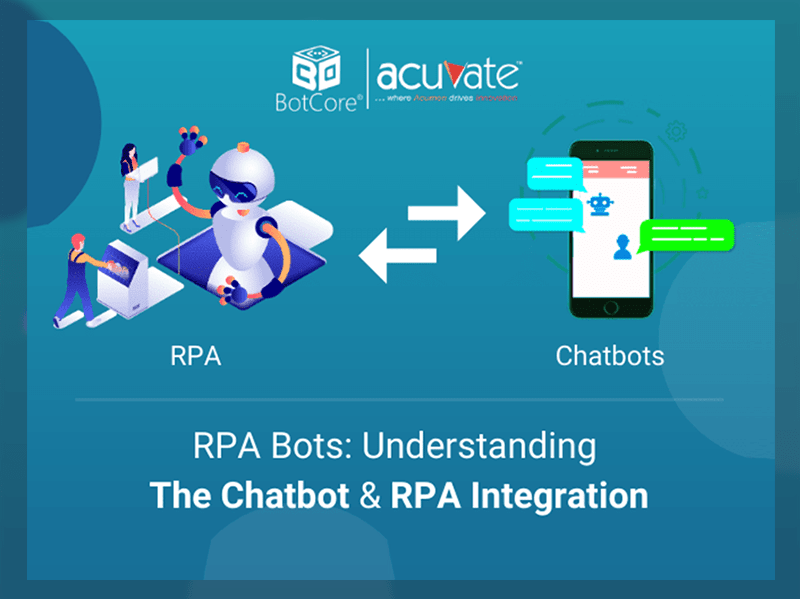
Integration of Chatbots and RPA:
- In some instances, chatbots and RPA are integrated to enhance automation. A chatbot can serve as the front-end interface, interacting with users and collecting information. This input can then trigger RPA bots to perform back-end tasks, such as data processing or updating records based on the user’s request. This combination allows organizations to automate the full spectrum of customer interactions – from the initial engagement via the chatbot to the completion of tasks via RPA.
In summary, while chatbots are focused on simulating human-like conversations and enhancing user interaction, RPA is centered on automating repetitive and rule-based business processes. Their integration can create powerful solutions that enhance both customer experience and operational efficiency.
Which Coding Languages Does RPA Require?
Robotic Process Automation (RPA) typically does not require extensive coding knowledge, especially with modern RPA tools designed to be user-friendly and accessible to non-developers. However, understanding some programming languages can be beneficial in certain scenarios, especially for more complex automation tasks or for integrating RPA with other systems. Here are a few programming languages and technologies that can be useful in the context of RPA:
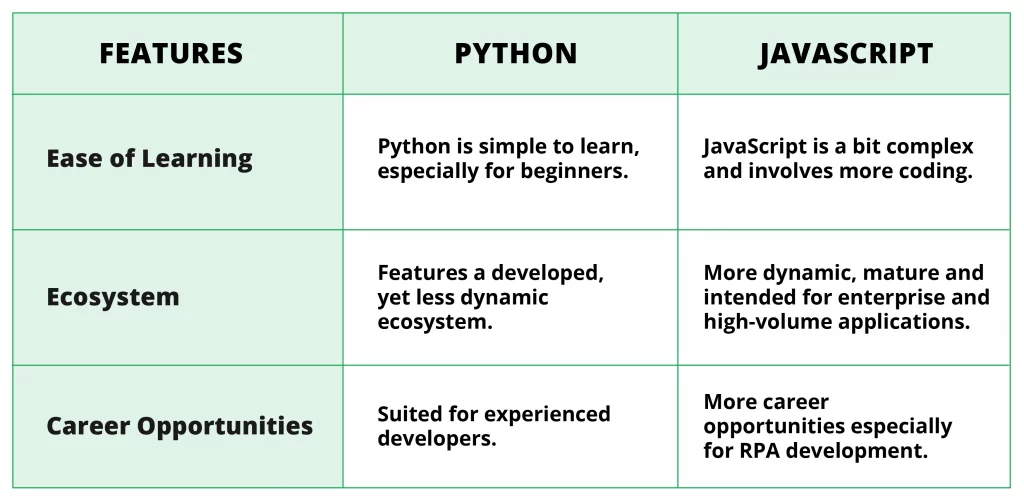
- Visual Basic for Applications (VBA): Given its use in automating tasks in Microsoft Office products, VBA can be handy in RPA for creating scripts that interact with Excel, Word, and other Office applications.
- Python: Known for its simplicity and readability, Python can be useful for data manipulation and integration tasks in RPA. It’s often used for more complex automation scenarios that require processing large datasets, machine learning, or integrating with web APIs.
- C# and .NET: Some RPA tools are built on the .NET framework, and understanding C# can be advantageous for creating custom activities or dealing with complex automation logic. It’s particularly useful when integrating RPA solutions with others. NET-based enterprise applications.
- Java: Java can be relevant for RPA when dealing with applications built on Java, or for integrating RPA solutions in a Java-based enterprise environment.
- JavaScript: For web automation tasks, knowledge of JavaScript can be helpful, especially for custom script development or manipulating web page elements during automation.
- SQL: For automation involving databases, knowledge of SQL is essential to perform tasks such as querying databases, updating records, or performing other data manipulation tasks.
- HTML/XML: Understanding HTML and XML can be beneficial for web scraping and working with web technologies in RPA.
- PowerShell: In some cases, especially in system administration tasks, using PowerShell scripts within RPA can be powerful.
Most leading RPA tools like UiPath, Blue Prism, and Automation Anywhere offer a graphical user interface for designing automation workflows, significantly reducing the need for traditional programming. However, these platforms often provide ways to extend functionalities using code, making programming skills a valuable asset for more complex RPA solutions.
It’s also worth noting that as RPA platforms evolve, they increasingly incorporate.
Robotic Process Automation Conclusion
In conclusion, Robotic Process Automation (RPA) is a transformative technology that has significant implications for businesses across various industries. Here are some key takeaways to consider:
- Efficiency and Productivity Gains: RPA dramatically improves efficiency and productivity by automating repetitive, rule-based tasks. This not only speeds up processes but also allows employees to focus on more strategic, creative tasks.
- Cost Reduction: By reducing the need for manual labor in certain processes, RPA can lead to substantial cost savings for organizations. It also minimizes errors associated with human intervention, further reducing operational costs.
- Scalability and Flexibility: RPA solutions are highly scalable and can be quickly adjusted to changing business needs. This flexibility allows businesses to respond rapidly to market changes and demand fluctuations.
- Enhanced Accuracy and Compliance: RPA tools are precise and consistent, which enhances the accuracy of data and processes. They also help in maintaining compliance with regulatory requirements by providing a clear audit trail of actions.
- Customer Satisfaction Improvement: By speeding up processes and reducing errors, RPA improves service delivery, enhancing overall customer satisfaction.
- Digital Transformation Enabler: RPA is a key enabler in the journey of digital transformation, allowing businesses to integrate advanced digital solutions with existing legacy systems.
- Workforce Impact and Re-skilling: While RPA can lead to changes in job roles, it also opens opportunities for workforce upskilling and re-skilling. Employees can shift to more value-added roles, focusing on analytical and strategic tasks.
- Continuous Improvement and Innovation: The adoption of RPA encourages a culture of continuous improvement and innovation as businesses seek new areas to automate and optimize.
- Challenges and Considerations: Implementing RPA requires careful planning, a clear understanding of objectives, and effective change management. Challenges such as selecting the right processes for automation, ensuring stakeholder buy-in, and managing the impact on the workforce should be adequately addressed.
- Future Trends: The future of RPA is likely to see greater integration with AI and machine learning technologies, enhancing its capabilities to handle more complex, decision-based tasks.
In summary, RPA is not just a tool for cost reduction; it’s a strategic enabler for enhancing operational efficiency, driving business growth, and fostering