how to Access Discovery Plus on Roku device: Complete Guide
As a devoted streamer, I’ve always sought new and exciting content platforms to explore. Recently, I discovered the wonders of Discovery Plus, a streaming service that offers a vast array of captivating documentaries, reality shows, and educational programming. However, getting set up on my Roku device was more complex than I’d hoped. I’ve decided to share my experience and provide a comprehensive guide to help fellow Roku users access the Discovery Plus platform quickly.
In this article, I’ll take you through the step-by-step process of setting up your Roku device for Discovery Plus, downloading the app, logging in, and navigating the platform to discover a wealth of engaging content. Whether you’re a seasoned Roku user or a newcomer to the world of streaming, this guide will equip you with the knowledge and confidence to start enjoying the best offers on your Discovery Plus on Roku device.
Table of Contents
Setting up your Roku device for Discovery Plus
Before we dive into the specifics of accessing Discovery Plus, ensuring that your Roku device is appropriately set up and ready to go is crucial. First, ensure your Roku device is connected to a stable internet connection, as a reliable network is essential for seamless streaming.
Next, take a moment to familiarize yourself with the Roku home screen and the various menus and settings available. This will help you quickly navigate the platform and locate the Discovery Plus app when it’s time to download it.
If you’re new to Roku, explore the device’s settings and customization options for a few minutes. This will allow you to personalize your Roku experience and ensure everything is configured to your liking before you start streaming.
How to download Discovery Plus on Roku
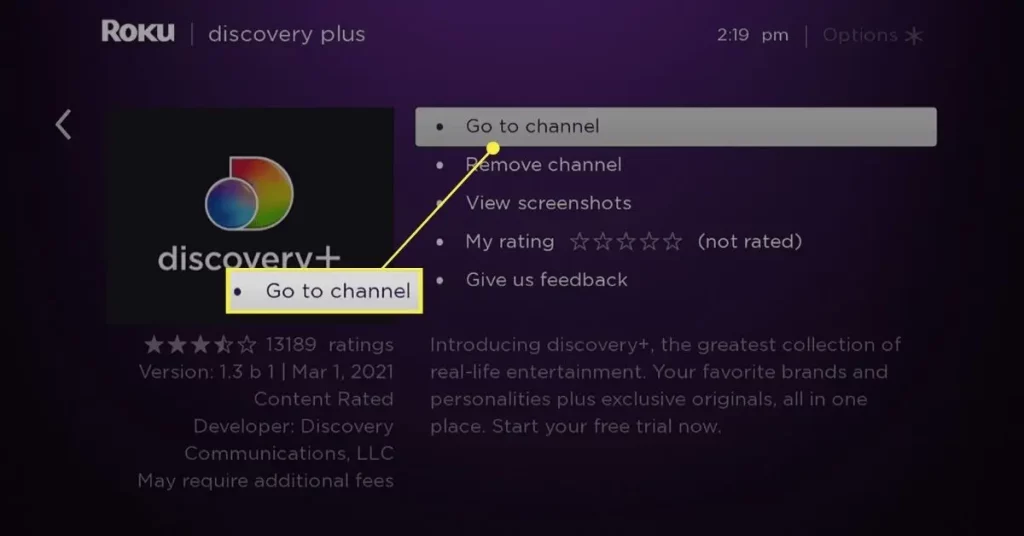
Once your Roku device is set up and ready, the next step is to download the Discovery Plus app. This is a straightforward process, and I’ll guide you through it step by step:
- From the Roku home screen, navigate to the “Streaming Channels” section.
- Use the search function to find the Discovery Plus app.
- Select the app and click “Add Channel” to download and install it on your Roku device.
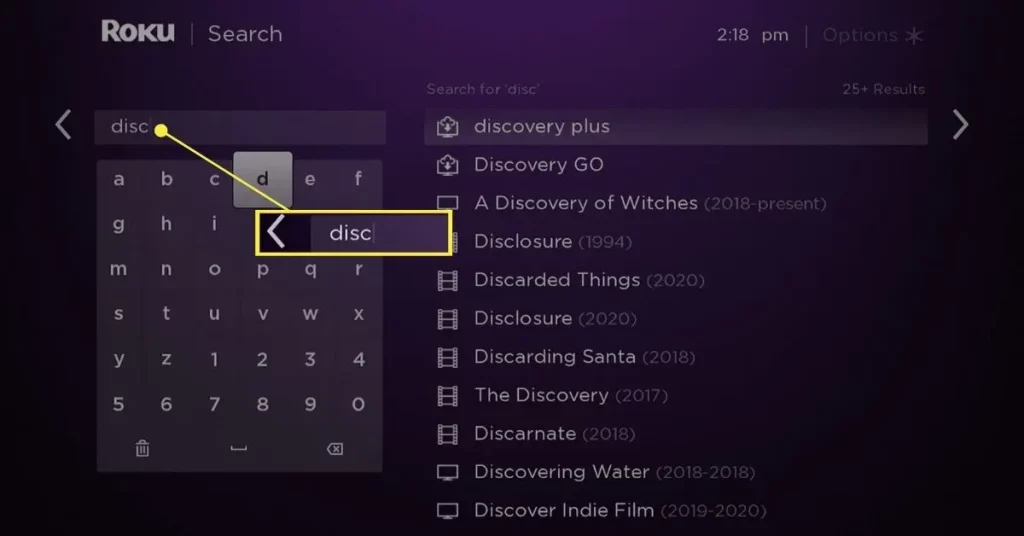
The download and installation process should only take a few moments, and once it’s complete, you can access the Discovery Plus app directly from your Roku home screen.
Logging in to your Discovery Plus account on Roku
With the Discovery Plus app installed, it’s time to log in and explore the platform’s extensive content library. Here’s how to get started:
- Open the Discovery Plus app on your Roku device.
- Select the “Sign In” option.
- Enter the email address and password associated with your Discovery Plus account.
- If you don’t have an account, you can choose the “Start Your Free Trial” option to sign up for a new subscription.
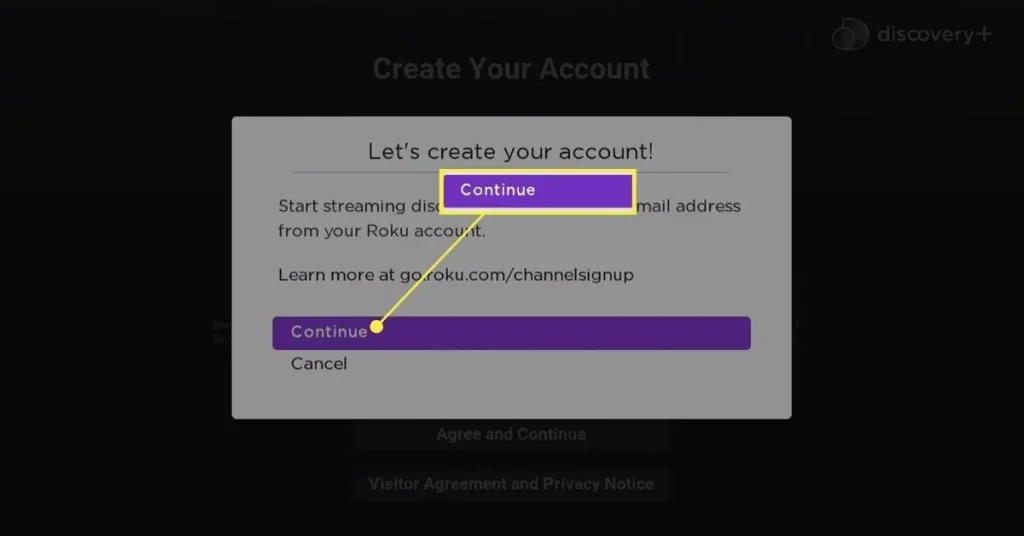
Once you’ve successfully logged in, you can access all the features and content available on Discovery Plus through your Roku device.
Navigating the Discovery Plus app on Roku
The Discovery Plus app on Roku is designed with user-friendliness, making it easy to navigate and find the content you’re interested in. Here’s a quick overview of the app’s main features and how to use them:
- Home Screen: The home screen of the Discovery Plus app on Roku provides a curated selection of featured content, including new releases, popular shows, and personalized recommendations based on your viewing history.
- Browse: The “Browse” section allows you to explore Discovery Plus’s extensive library by genre, channel, or specific shows and movies.
- Search: If you have a specific title in mind, the search function makes it easy to find what you’re looking for. Type in the show, movie, or topic name, and the app will display relevant results.
- Watchlist: The “Watchlist” feature lets you save your favorite shows and movies, making it easy to pick up where you left off or revisit them later.
- Settings: The app’s settings menu provides options to customize your viewing experience, such as adjusting video quality, enabling closed captions, and managing your account information.
By familiarizing yourself with these core features, you’ll be able to confidently navigate the Discovery Plus app on Roku and efficiently find content that aligns with your interests.
Exploring the content on Discovery Plus
One of the primary reasons to subscribe to Discovery Plus on your Roku device is the platform’s vast and diverse content library. From award-winning documentaries to captivating reality shows, Discovery Plus offers something for every viewer. Here are a few highlights of the content you can expect to find:
- Documentaries: Delve into science, nature, history, and more with high-quality documentaries from renowned producers like Discovery Channel, Animal Planet, and Science Channel.
- Reality TV: Indulge in the drama and excitement of popular reality shows, such as “Cake Boss,” “90 Day Fiancé,” and “Gold Rush.”
- Home and Lifestyle: Discover inspiring home renovation projects, cooking demonstrations, and lifestyle tips from experts in the field.
- True Crime: Explore captivating true crime stories and investigations that will keep you on the edge.
- Kids and Family: Engage your little ones with educational and entertaining content from channels like Discovery Kids and Magnolia Network.
With a constantly expanding library, Discovery Plus always has something new to discover, ensuring you’ll always have engaging content to stream on your Roku device.
Customizing your Discovery Plus experience on Roku
To make the most of your Discovery Plus experience on Roku, it’s worth taking the time to customize the app to your preferences. Here are a few ways you can personalize your viewing experience:
- Create Profiles: Discovery Plus allows you to set up multiple user profiles, giving each household member personalized recommendations and watchlists.
- Manage Preferences: In the app’s settings, you can adjust various preferences, such as video quality, closed captions, and language options, to tailor the viewing experience to your needs.
- Utilize Watchlists: The “Watchlist” feature is a powerful tool for keeping track of the shows and movies you want to watch. Add your favorites to the list for easy access and to pick up where you left off.
- Explore Recommendations: The Discovery Plus app on Roku provides personalized recommendations based on your viewing history and preferences. Take advantage of these suggestions to discover new and exciting content that aligns with your interests.
By taking the time to customize your Discovery Plus experience, you’ll be able to streamline your viewing habits and ensure that you’re getting the most out of the platform on your Roku device.
Alternatives to Discovery Plus on Roku
While Discovery Plus is a fantastic option for streaming a wide range of documentaries, reality shows, and lifestyle content, it’s not the only platform available on Roku. Here are a few alternative streaming services you may want to consider:
- Netflix: The classic streaming giant offers a vast library of movies, TV shows, and original content, including a growing selection of documentaries and docuseries.
- Hulu: With a diverse selection of both on-demand and live TV content, Hulu is an excellent option for those seeking a more comprehensive streaming experience.
- Amazon Prime Video: In addition to its extensive catalog of movies and TV shows, Amazon Prime Video also features a selection of high-quality documentaries and reality programming.
- PBS: For those interested in educational and public television content, the PBS app on Roku provides access to a wealth of documentaries, historical programs, and children’s shows.
By exploring these alternative platforms, you can expand your streaming horizons and find the perfect complement to your Discovery Plus experience on your Roku device.
Also Read: Troubleshooting Guide: How to Fix Chromebook Not Charging Issue
Frequently Asked Questions
Q: Is Discovery Plus available on all Roku devices?
A: The Discovery Plus app is compatible with various Roku devices, including the Roku Streaming Stick, Roku Ultra, Roku Express, and Roku TV models.
Q: Do I need a separate subscription for Discovery Plus if I already have a Roku Premium subscription?
A: No, a Roku Premium subscription does not include access to Discovery Plus. You must sign up for a separate Discovery Plus subscription to access the platform’s content on your Roku device.
Q: Can I download the Discovery Plus app on multiple Roku devices in my household?
A: Absolutely! Using the same login credentials, you can download the Discovery Plus app on as many Roku devices as you’d like.
Q: Can I download content from Discovery Plus for offline viewing on my Roku device?
A: Unfortunately, the Discovery Plus app on Roku does not currently offer the ability to download content for offline viewing. The content can only be streamed while you’re connected to the internet.
Conclusion
Accessing Discovery Plus on your Roku device is a straightforward process that can unlock a world of engaging content. Following the steps outlined in this guide, you can download the app, log in to your account, and explore the vast library of documentaries, reality shows, and more. Customize your experience and consider alternative streaming options to find the perfect fit for your entertainment needs. Happy streaming!